How a Professional Website Builds Credibility for Manufacturing and B2B Companies
 Shivam Kumar


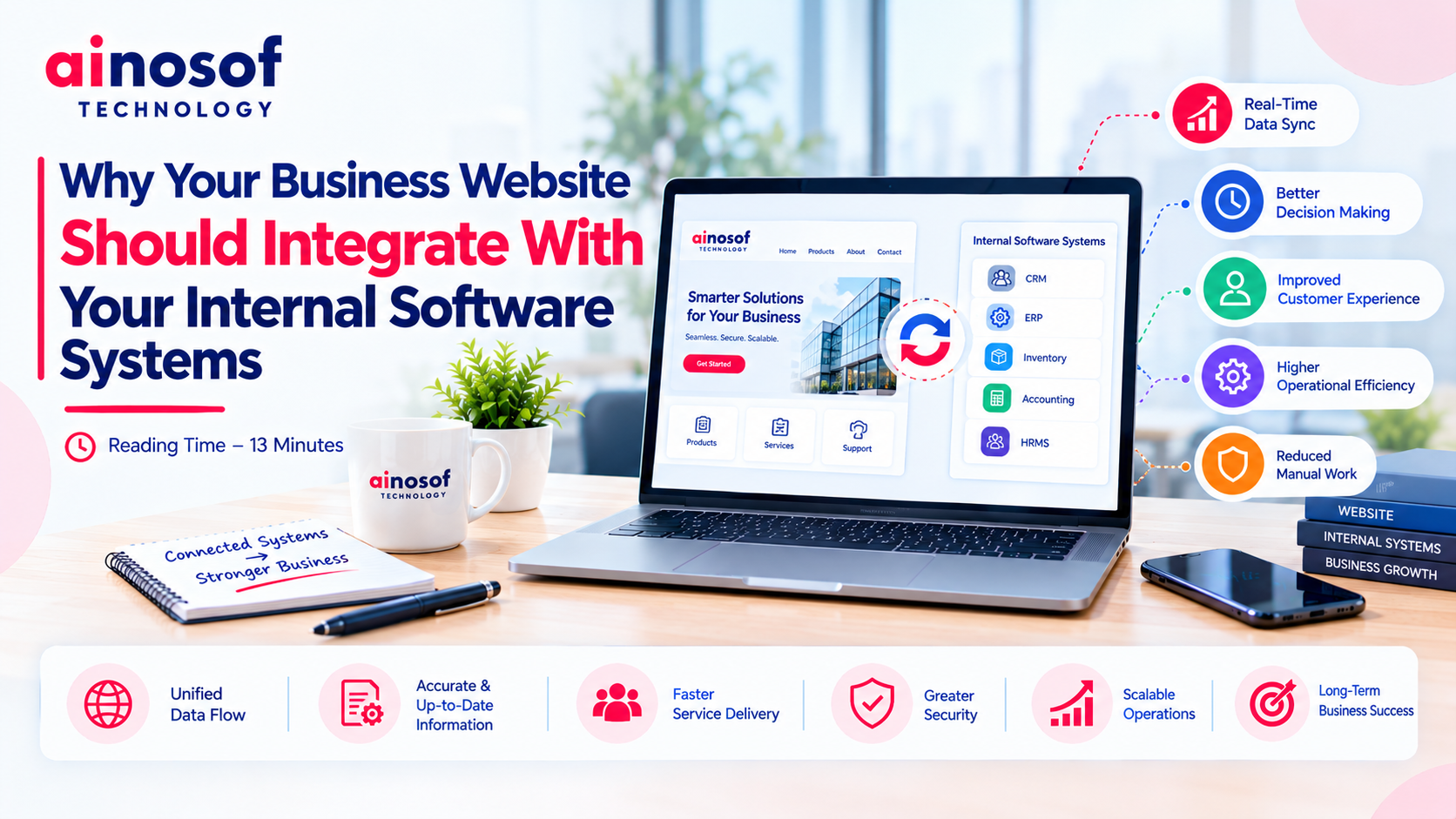
A business website may generate enquiries, attract customers and showcase products, but what happens after a visitor submits a form, requests a quotation or places an order? If employees must manually transfer that information into a CRM, ERP, inventory system or spreadsheet, the website is creating work that could often be reduced through better integration.
This becomes more important as a business grows. More enquiries mean more records to manage, more orders require coordination, and more departments need access to consistent information. When the website and internal software operate separately, employees spend time moving data instead of responding to customers and managing operations.
The problem is not necessarily the website design. It is the gap between the customer-facing website and the systems that run the business behind the scenes.
Effective corporate website development should therefore consider not only how a website looks and performs, but also how it connects with the company's existing workflows. This article explains why that connection matters, which systems may need integration and how businesses can plan it without introducing unnecessary complexity.
A website and internal business software may work well independently, yet create difficulties when employees must coordinate information between them manually. The more frequently information moves between systems, the greater the opportunity for delays, duplication and errors.
For businesses handling regular enquiries, product requests or customer transactions, these problems can gradually affect productivity and customer experience.
Consider a business that receives enquiries through its website. Every new enquiry must be checked, copied into a CRM or spreadsheet, assigned to a salesperson and followed up.
If the process depends entirely on employees, an enquiry submitted during a busy period may remain unattended. A salesperson may not know that a potential customer has already contacted the company, while a manager may have difficulty tracking which enquiries need attention.
Website integration can reduce these manual steps. For example, an enquiry form can send information directly to a CRM, create a lead record and trigger a notification for the relevant team.
The exact workflow depends on the systems involved, but the objective is straightforward: information should reach the right department without unnecessary copying and repeated entry.
The same principle applies to quotation requests, service bookings, support tickets and customer registration. When information moves automatically through a defined process, employees can focus more on handling the request rather than transferring its details.
When website data is entered into several systems separately, different versions of the same information can emerge.
A customer might update their contact details through a website form, while the CRM retains the old information. Product availability may change in the inventory system without being reflected on the website. A sales representative may update a customer's status in one application while another department continues working with an outdated record.
These inconsistencies can cause avoidable confusion.
Common examples include:
Integration can help keep information synchronized, but only when businesses define which system is responsible for each record and how updates should be handled.
For example, the inventory system might remain the authoritative source for stock quantities, while the website displays the relevant availability information. This prevents the website from becoming a separate, manually maintained source of operational data.
Not every website needs to connect with every internal application. The right integrations depend on how the business attracts customers, processes requests, manages products and delivers its services.
Businesses should start with the connections that remove the most significant operational bottlenecks.
Three common integration opportunities involve customer relationship management, enterprise resource planning and inventory management.
CRM integration
A website connected to a CRM can transfer enquiries into the customer management system, record relevant details and support lead assignment. Sales teams can then manage follow-ups and review customer interactions from a central location.
This is particularly useful for businesses that receive enquiries through contact forms, quotation requests, product pages or campaign landing pages.
ERP integration
An ERP system may manage purchasing, finance, inventory, production or other business operations. Connecting the website with the appropriate ERP functions can reduce repeated data entry and improve coordination between online requests and internal processes.
For example, a business receiving B2B orders through its website may need order information to flow into its internal order management process. Depending on the ERP capabilities, integration may also support customer records, product information and order-status updates.
Inventory integration
Businesses selling products or supplying stock-sensitive items may benefit from connecting the website with their inventory system. This can help display current product availability or support order validation before processing.
However, inventory integration requires careful handling of synchronization frequency, reserved stock, multiple warehouses and failed updates. A website should not promise availability based on outdated information.
The best approach is to identify the authoritative system for each data type and define how information moves between applications.
Billing, order management and customer portals become relevant when website activity directly affects transactions or ongoing customer relationships.
A business accepting online orders may need website submissions to create records in an order management system. A quotation-based company may need requests to reach its sales workflow before an invoice is generated. A service provider may need customers to view project updates, submit documents or track service requests through a portal.
Possible integrations include:
These connections should follow the business's actual process. For instance, a quotation request should not automatically become a confirmed order unless the necessary approval and commercial conditions have been satisfied.
A well-planned integration connects customer-facing actions with the appropriate internal workflow while preserving the checks required to run the business reliably.
Integration is not simply a matter of connecting two applications. Businesses need to understand their current systems, data ownership, workflow requirements, security obligations and long-term maintenance needs.
A clear plan helps prevent a technically successful integration from becoming difficult to manage in daily operations.
The answer depends on the website's current technical condition and its ability to support the required connections.
If the existing website has a maintainable architecture, compatible APIs or suitable integration options, upgrading it may be more practical than rebuilding the entire platform.
However, a rebuild may be worth considering when the website uses outdated technology, has serious performance or security limitations, cannot support essential workflows or requires extensive workarounds for every new integration.
Compare the options before deciding.
|
Consideration |
Integrate the existing website |
Rebuild and integrate |
|
Initial investment |
May be lower if the current platform is suitable |
Usually involves a larger initial project |
|
Technical compatibility |
Depends on the existing architecture |
Integration can be planned around new requirements |
|
Design changes |
Limited by the current platform where applicable |
Greater flexibility to redesign the experience |
|
Implementation effort |
Focuses on required modifications and connections |
Includes rebuilding, testing and migration |
|
Business disruption |
May be limited with careful planning |
Requires planning for launch and transition |
|
Future scalability |
Depends on the existing technology |
Can be designed around anticipated requirements |
|
Maintenance |
Retains some existing technical dependencies |
Introduces a new system that also needs maintenance |
These are general considerations, not fixed outcomes. An existing website may be difficult to integrate, while a new website can still be poorly designed for future needs.
Businesses should first document the required workflow and ask a developer to assess the current website, available APIs, data structures and integration limitations.
Professional business website development services should address these operational requirements alongside design, usability, performance and security. Rebuilding should be recommended only when it provides a meaningful advantage over upgrading the existing platform.
A website connected to internal software may exchange customer information, order details, employee data or financial records. These connections must be designed to prevent unauthorized access and avoid inconsistent or incomplete updates.
Businesses should address several areas before implementation.
Data ownership: Identify which application is the authoritative source for customers, products, stock, orders and other records.
Access control: Give each integration only the permissions it requires. Public website forms should not provide unrestricted access to internal systems.
Data validation: Check submitted information before creating or updating internal records. Invalid fields, duplicate submissions and unexpected values should be handled safely.
Error handling: Decide what happens when an application is unavailable, a connection fails or an update cannot be completed. Failed transactions should be visible to the appropriate team rather than silently lost.
Testing: Test normal transactions, incomplete forms, duplicate requests, expired credentials and interrupted connections before launch.
Maintenance: Plan for API changes, software updates, security patches, monitoring and support after deployment.
Costs should also be evaluated beyond the initial development quotation. Integration may involve API access fees, third-party subscriptions, data cleanup, testing, hosting changes and ongoing technical support.
A useful starting checklist is:
Before committing to a large project, prioritize one important workflow and test it from beginning to end. This provides a clearer understanding of the practical benefits, implementation effort and issues that must be resolved before expanding the integration.
Explore these related topics to understand how connected technology can support your operations:
Start with the area most closely related to your current operational challenge. A focused improvement can provide a practical foundation for broader digital development.
Your business website should do more than present information. When it supports customer enquiries, quotation requests, orders or ongoing services, it becomes part of the business's operational workflow.
If the website remains disconnected from internal software, employees may spend unnecessary time transferring information, correcting records and coordinating tasks manually. Integrating the right systems can reduce these gaps and help departments work with more consistent information.
The decision does not always require a new website or a complex integration project. Some businesses can improve their existing platforms, while others may need a more substantial redevelopment to support future requirements.
The practical approach is to identify the most expensive or time-consuming manual workflow, assess the systems involved and implement an integration that can be tested and measured.
Ainosof Technology can be considered when evaluating corporate website development, custom software and connected business workflows. The priority should be to choose a solution that fits your operations, protects business data and delivers measurable value as your company grows.
Integration allows website information to flow into the internal systems that manage customers, orders, inventory or service requests. It can reduce manual data entry, improve information consistency and help employees respond to website activity more efficiently. The value depends on the business workflow and the quality of the integration.
Corporate website development can include planning and implementing connections between the website and internal business applications. These connections may support enquiry management, customer records, inventory information, order processing and reporting. Integration requirements should be considered during planning rather than treated as an afterthought.
Yes, provided the website and the relevant software support compatible integration methods. APIs, webhooks and other approved interfaces can transfer information between systems. The implementation must account for authentication, data mapping, validation, permissions and error handling.
Integration can automatically transfer information from website forms, orders or service requests into the appropriate internal workflow. Employees may no longer need to copy the same details into several applications. The actual reduction in work depends on which steps are automated and how much manual verification remains necessary.
Integrating an existing website may be sufficient if its technology is maintainable and supports the required connections. A rebuild may be more appropriate when the platform has serious technical limitations, security issues or cannot support essential workflows efficiently. Businesses should compare both options before deciding.
Yes. Small businesses can benefit from focused integrations, such as sending website enquiries directly to a CRM or connecting product availability to inventory software. A limited, well-chosen integration may provide more value than a large system connecting every application at once.
Businesses should evaluate technical experience, integration capabilities, security practices, performance, maintainability and ongoing support. They should also confirm whether the provider understands their operational workflows and can explain the implementation approach, costs, limitations and expected outcomes.
Look for a provider that considers both the customer-facing website and the internal systems behind it. Review relevant project experience, API integration skills, security practices, testing procedures, communication and maintenance arrangements. The right partner should recommend a solution based on business needs rather than unnecessary complexity.
 How AI Agents Are Becoming Part of Custom Business Software in 2026
10 Oct, 2026
How AI Agents Are Becoming Part of Custom Business Software in 2026
10 Oct, 2026
 Why Manual Attendance Tracking Is Costing Your Business Time and Money
09 Oct, 2026
Why Manual Attendance Tracking Is Costing Your Business Time and Money
09 Oct, 2026
 How to Build a Client Portal That Improves Customer Experience and Reduces Support Load
08 Oct, 2026
How to Build a Client Portal That Improves Customer Experience and Reduces Support Load
08 Oct, 2026
 What Is an MIS and Why Growing Businesses Can't Scale Without One
07 Oct, 2026
What Is an MIS and Why Growing Businesses Can't Scale Without One
07 Oct, 2026
 Billing Software: How It Helps Businesses Eliminate Invoice Errors and Delays
06 Oct, 2026
Billing Software: How It Helps Businesses Eliminate Invoice Errors and Delays
06 Oct, 2026
 How to Choose the Right HRMS Software for Your Growing Team
05 Oct, 2026
How to Choose the Right HRMS Software for Your Growing Team
05 Oct, 2026
Comment with an expert and get our answer.
Comment with an expert and get our answer.
Explore more insights related to this topic and discover useful perspectives, ideas and strategies from our latest articles.